Usage & Monitoring#
Nebula tracks execution metrics for every agent invocation — models used, tokens consumed, estimated costs, and errors. This data is available in the Settings overview.
Usage Dashboard#
The Settings → General tab shows an org overview with usage statistics.
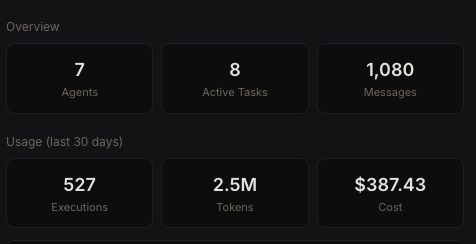 Usage dashboard
Org Overview#
- Total agents
- Active tasks
- Total messages
- Total executions
Usage Metrics#
Displayed for both 30-day and all-time windows:
- Total executions
- Total tokens consumed
- Estimated cost
- Top models by execution count
- Top agents by execution count
Error Tracking#
The Settings → System tab shows recent execution errors.
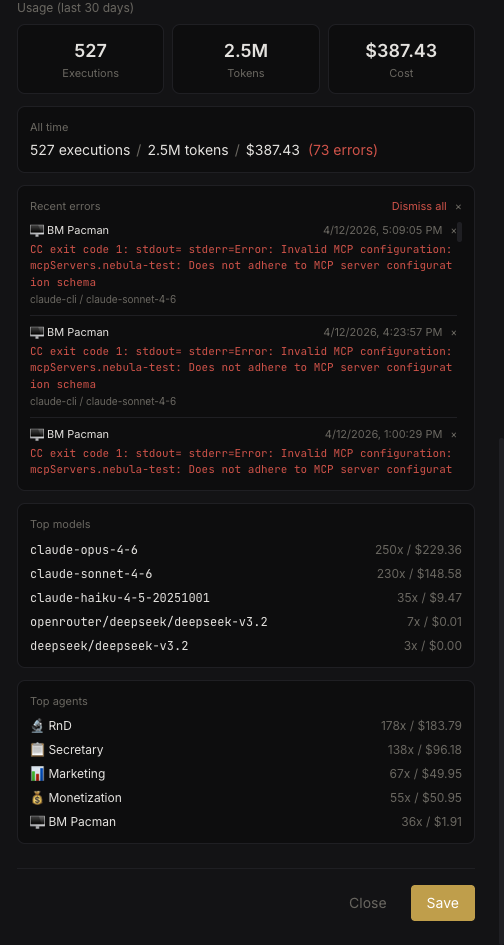 Error log
Each error entry includes:
- Timestamp
- Agent name
- Model used
- Error message
You can dismiss individual errors or clear all errors at once. Errors are paginated (50 per page, max 200).
What Gets Tracked#
Every agent execution logs:
- Which model was used
- Token counts (input + output)
- Estimated cost (based on model pricing)
- Success or error status
- Agent and conversation context
This happens automatically — no additional configuration required.