CLI Runtimes#
Nebula doesn't ship its own AI engine. Instead, it uses a pluggable CLI registry — each supported AI CLI tool gets a thin adapter that normalizes its interface for Nebula's execution engine. No CLI is hardcoded; the executor reads adapter properties instead of checking runtime names.
Supported Runtimes#
| Runtime | Provider | Requires API Key | Skill Injection | Session Resume |
|---|---|---|---|---|
| Claude Code | Anthropic | No (claude login) | Disk (.claude/skills/) | --resume <id> |
| OpenCode | OpenCode | Yes | System prompt (inlined) | --session <id> |
| Codex CLI | OpenAI | Yes | System prompt (inlined) | Per-session |
| Gemini CLI | Yes | System prompt (inlined) | Per-session |
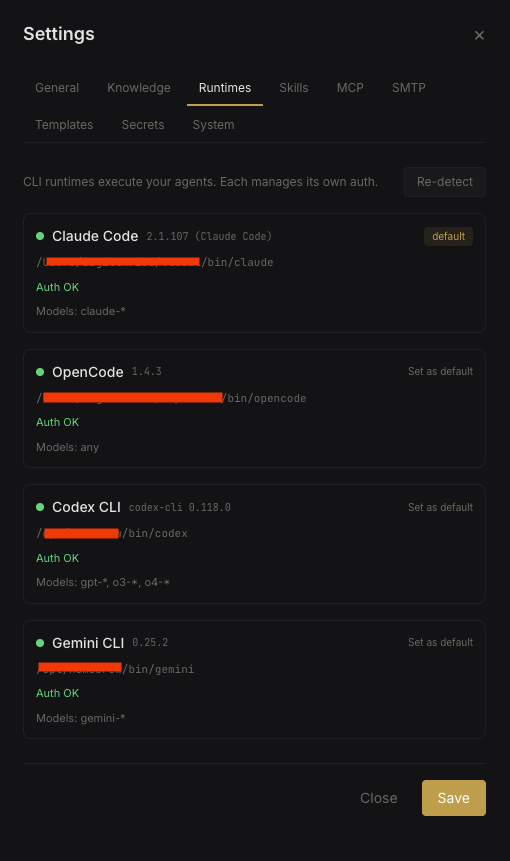 Runtime detection and status
How Runtimes Work#
When an agent executes a task, Nebula:
- Resolves the runtime — agent's configured backend → org default → any available CLI that can run the model → error
- Assembles the context — system prompt, skills, MCP configs, memory titles
- Spawns a persistent CLI session via
node-pty - Injects skills either as files on disk or inlined into the system prompt, depending on the adapter
- Streams output back through WebSocket in real-time
Sessions are persistent — the same CLI process handles multiple messages within a conversation, so the agent retains full context.
Runtime Resolution#
When an agent runs, Nebula picks the runtime using this priority:
- Agent's explicitly configured backend (if available and can run the selected model)
- Org default runtime (set in Settings → Runtimes)
- Any available CLI that supports the agent's model
- Error if nothing matches
Adding a New Runtime#
Adding a new CLI is one adapter file + one line of registration:
- Create an adapter in
src/backends/that extendsExecutionBackend - Implement the required methods: binary detection, session spawning, message passing, output parsing
- Register it in
src/backends/index.js
// src/backends/index.js
registry.register(new YourNewBackend());
The adapter handles CLI-specific quirks (argument format, output parsing, session management) so the rest of Nebula stays runtime-agnostic.
Note: Runtimes are detected at startup. After installing a new CLI tool, restart the Nebula container or click Re-detect in Settings → Runtimes.